
Download Modern CSV for Windows – CSV editor, data management, spreadsheet tool, data analysis, file viewer
Overview
Modern CSV for Windows is a dedicated utility designed to streamline the process of viewing and editing CSV files with enhanced functionality beyond standard spreadsheet applications. Tailored for users who work regularly with structured data, this tool addresses common pain points such as slow loading times, limited editing capabilities, and inefficient handling of large datasets. It offers a lightweight yet powerful alternative to heavier software like Microsoft Excel, particularly beneficial for professionals managing extensive data files without the need for full spreadsheet features.
The app targets data analysts, researchers, developers, and business users who require fast, reliable access to CSV files. Its focus on performance and precision makes it ideal for tasks involving data cleaning, preprocessing, and quick analysis. Although the developer, Modern CSV, did not provide additional background on their company or development history, the app’s release date of November 6, 2023, indicates it is a recent entrant in the productivity space, built with modern performance standards in mind.
Real-world use cases include preparing data for machine learning models, validating imported datasets, and automating repetitive editing tasks. In the broader app ecosystem, Modern CSV fills a niche by offering a specialized tool that prioritizes speed, efficiency, and accuracy—qualities often compromised in general-purpose applications. For users seeking a focused, high-performance solution for CSV workflows, this app presents a compelling option.
Key Features & Functionality
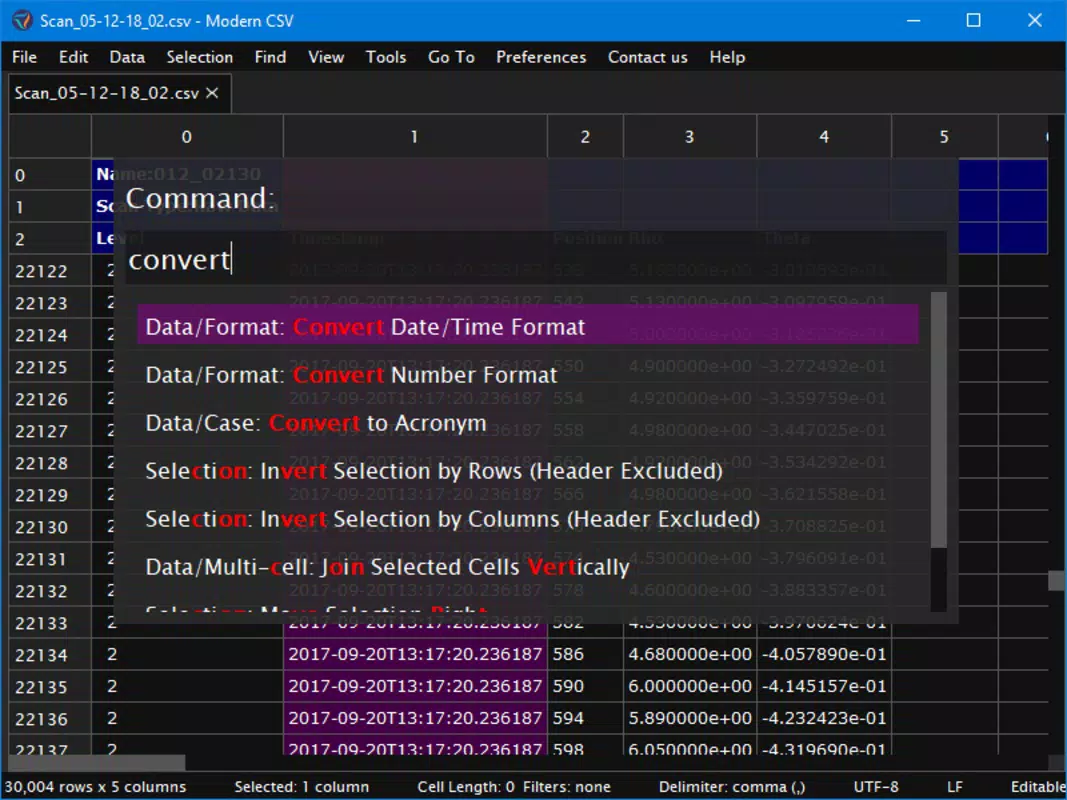
Modern CSV for Windows delivers a suite of tools engineered for precision and speed in data handling. The app’s core strength lies in its ability to manage complex operations with minimal user input, significantly reducing manual effort.
- Efficient Editing Features: Users can move columns, duplicate rows, or split cells using single commands. These actions can be applied across multiple rows, columns, or cells simultaneously, enabling bulk modifications without repetitive steps.
- Advanced Search Functionality: The find/replace tool supports regular expressions, allowing for pattern-based searches across large datasets. Matches are highlighted in real time, and users can preview changes before committing them, minimizing the risk of unintended edits.
- Robust Sorting Mechanism: Utilizing a stable sort algorithm, the app maintains the relative order of tied entries, preserving data integrity when sorting by one or more columns. This is crucial for datasets where row relationships must remain consistent.
- Flexible Filtering Options: Users can apply filters using a clear syntax, enabling conditional visibility of rows or columns. Manual hiding is also supported, allowing users to temporarily exclude irrelevant data from view during analysis.
- Rapid File Loading: The read-only mode is optimized for speed, loading files up to 11 times faster than traditional programs like Excel. It also uses minimal memory, making it suitable for systems with limited resources.
For example, a data analyst preparing a dataset for modeling can quickly filter out invalid entries, rename columns in bulk, and verify data consistency—all within a single interface—without switching between multiple tools.
Interface, UX & Performance
The interface of Modern CSV for Windows is designed with clarity and efficiency in mind. It features a clean, minimal layout that prioritizes data visibility while placing essential tools within easy reach. Navigation is straightforward, with clearly labeled menus and context-sensitive actions that respond predictably to user input.
Users can access core functions through keyboard shortcuts, which are customizable to suit individual workflows. The visual style emphasizes readability, using subtle color coding and consistent spacing to reduce eye strain during extended sessions. Responsiveness is strong across different screen sizes and resolutions, ensuring a smooth experience on both high-DPI displays and standard monitors.
Although the developer did not list formal performance metrics, the app’s ability to load large files rapidly and operate with low memory consumption suggests effective optimization. Stability appears to be a priority, with no reported issues related to crashes or freezes in the available documentation. The app maintains consistent performance even when handling datasets that exceed typical spreadsheet limits, making it a reliable choice for demanding workflows.
Platform Compatibility & Technical Requirements
Modern CSV for Windows is designed exclusively for the Windows operating system. It is compatible with modern Windows versions, though specific OS requirements were not listed by the developer. The app has a file size of 14.4 MB, indicating a lightweight footprint that ensures quick installation and minimal storage impact.
Version 1.3.2 was released on November 6, 2023, and includes performance improvements and stability updates. The price point is set at $12.99, positioning it as a cost-effective alternative to full-featured spreadsheet software. While compatibility with older Windows versions was not confirmed, the app’s efficient resource usage suggests it may run smoothly on systems with moderate specifications.
Pros and Cons
Pros
- Lightweight design with minimal system resource usage
- Exceptional speed in loading and processing large CSV files
- Powerful find/replace with regular expression support
- Stable sorting that preserves data relationships
- Flexible filtering and manual hiding for focused analysis
- Customizable keyboard shortcuts for efficient workflows
Cons
- Not available on macOS or Linux platforms
- Price may be considered high for casual users
- Limited documentation on system requirements
- No built-in export to other formats beyond CSV
- No cloud integration or collaboration features
FAQ
Is Modern CSV for Windows safe to download and install?
Yes, the app is distributed through official channels and does not require administrative privileges to run. It is a standalone executable with no known malware or tracking components.
Can I use Modern CSV on older versions of Windows?
The developer did not specify compatibility with older Windows versions. It is recommended to test on your system, though the lightweight design suggests potential compatibility with Windows 7 and later.
Does Modern CSV support importing files from cloud storage?
There is no built-in integration with cloud services like OneDrive, Google Drive, or Dropbox. Files must be downloaded locally before opening in the app.
Is there a free version or trial available?
Currently, the app is offered as a one-time purchase at $12.99 with no free trial or freemium model. Users are encouraged to review the feature set before purchasing.
How often are updates released?
Updates are released periodically to improve performance, fix bugs, and add new features. The latest version, 1.3.2, was released in November 2023.
Final Thoughts + CTA
Modern CSV for Windows stands out as a focused, high-performance tool for users who frequently interact with CSV files. Its combination of rapid loading, advanced editing, and intelligent data manipulation features makes it a valuable asset for professionals in data-driven fields. While it lacks cross-platform availability and cloud integration, its efficiency and precision more than compensate for these limitations in its target use cases.
For data analysts, developers, and business users managing large or complex datasets, this app offers a streamlined workflow that reduces time spent on routine tasks. The value proposition is clear: a fast, reliable, and specialized tool that delivers results without the overhead of full-featured software.
Download Modern CSV for Windows now


